
GPT Image-2.5 for Artistic Birth Charts & Janam Kundli
See how Artistic Birth Chart combines calculated chart references, GPT Image-2.5 and coordinated themes to create personalized birth chart and Kundli artwork.
An artistic birth chart should feel personal before you read a single label: the palette, composition, name, and celestial details should belong together. It should also preserve the information that makes it your chart.
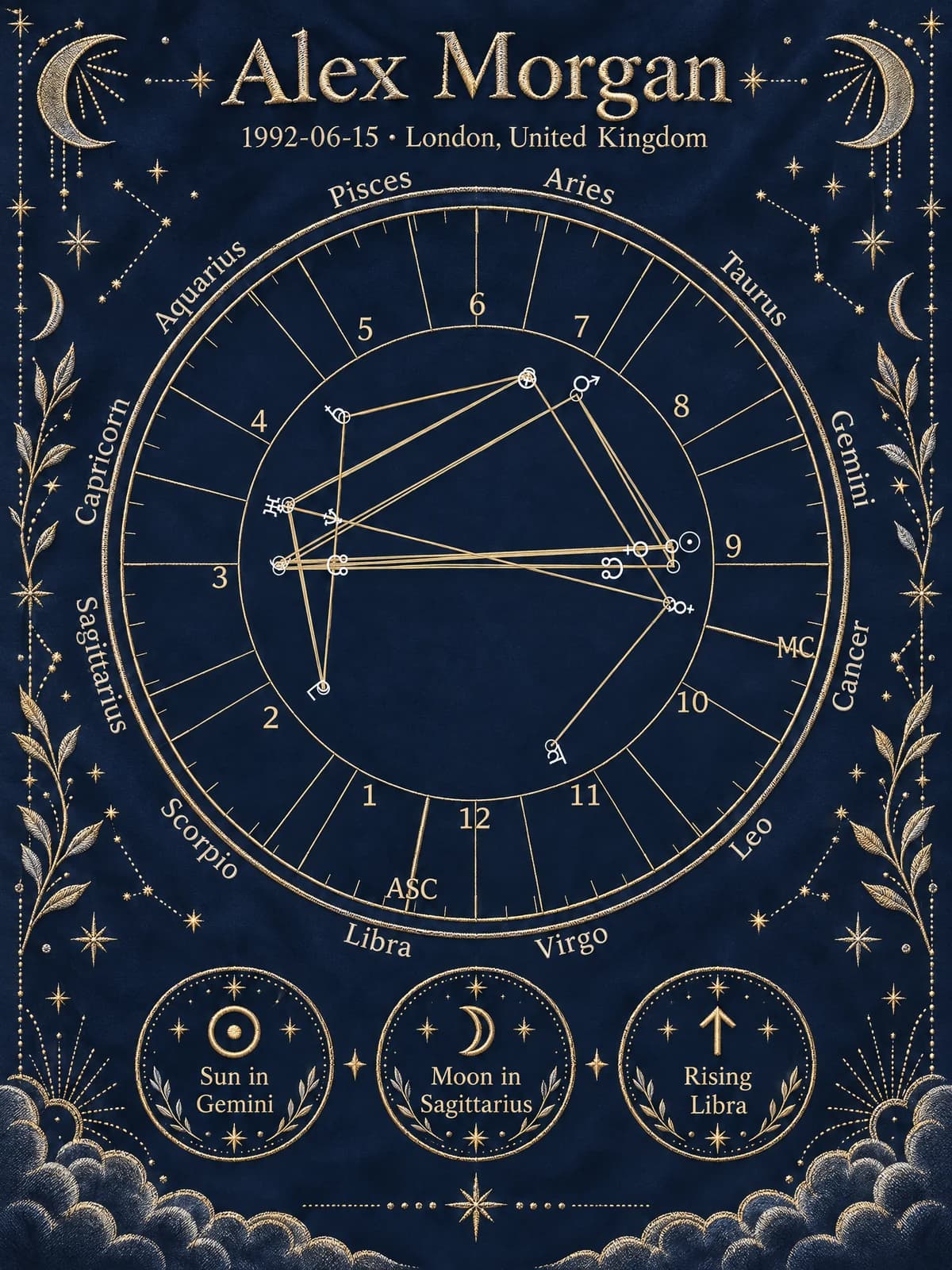
At Artistic Birth Chart, our GPT Image-2.5 integration brings a newer image-generation option to that workflow. We combine a calculated chart reference with theme-specific design instructions to produce personalized Western birth chart and Janam Kundli artwork. The aim is a coherent keepsake with a readable chart, not decoration that overwhelms the birth information.
Explore the artwork themes or start creating your chart to see the available experience.
Why we integrated GPT Image-2.5
In its Images 2.5 announcement, OpenAI describes improvements in detail, texture, editing consistency, and generation speed. The API family includes Flare and Sunburst, with Sunburst intended for more detailed creative work at longer generation times.
Our integration supports the GPT Image-2.5 family, with Sunburst as the default model choice in the artwork configuration. The active generation model remains configurable, so we can adjust quality and operation as the service evolves. That configuration applies to the artistic workflow rather than replacing the chart calculation engine.
For customers, the useful question is what the final image looks like: whether small labels remain readable, the style feels intentional, and the decorative treatment works with the chart's structure. A newer model is a tool toward those goals, not a guarantee that every generated image will be flawless.
How birth data becomes chart artwork
1. Start with the birth information
The workflow begins with the selected chart type and birth details. Date, local time, and birthplace establish the inputs for the calculation. Western and Vedic charts have different conventions, so choosing the system comes before choosing a visual style.
If you are unsure which one to order, start with our birth chart versus Janam Kundli guide. For a traditional Kundli, also check which layout you want to read and display.
2. Render a calculated source chart
Our rendering service creates a chart image from the underlying calculation. This gives the artistic step a concrete visual reference: a Western chart wheel or a Vedic chart layout, rather than only a sentence asking AI to imagine someone's horoscope.
The distinction is essential. The image model does not work out astronomical positions from a person's name or invent birth data. Calculated chart information comes first.
3. Compose the theme around the reference
The image-editing stage receives that chart reference together with design and chart-preservation instructions. Theme-specific prompts guide the palette, ornament, composition, and placement of personal text.
This is why we use a reference-led editing workflow. The chart and its surrounding artwork are considered together during generation. We do not rely on generating an unrelated background and hoping the chart will fit into it afterward.
Western and Vedic designs also need different treatment. A circular chart wheel and a traditional Kundli grid should not be styled as if they were interchangeable shapes. The theme gallery separates the available collections so you can choose within the right chart family.
4. Review the information and the finished artwork
Image editing remains generative. A model can create an attractive result while changing a small character, symbol, or line. Preservation instructions reduce unwanted changes, but they do not establish a mathematical guarantee.
Check personal details before submission, then compare important labels and placements in the finished image with the calculated chart and report. Our Kundli design and accuracy guide explains what to inspect in a traditional layout.
Choose a style that suits the chart and the person
For Western birth chart artwork, consider whether you want a soft watercolor effect, restrained minimalism, or a bolder celestial palette. For Janam Kundli, look at the traditional and sacred design collections available for that chart type. Use the current gallery as the reference for supported themes.
Think about the recipient and the intended setting. A design for a quiet study may benefit from subtle color and generous spacing; a celebratory keepsake may suit richer ornament. In either case, the chart needs enough contrast to remain readable.
Our personalized birth chart art guide covers composition, names, and the difference between choosing a beautiful thumbnail and a useful finished piece.
A practical checklist for your finished image
- Verify the name, birth date, time, and location against your submitted details.
- Confirm that the artwork represents the intended Western or Vedic chart.
- Zoom in on planet symbols, house boundaries, and degree labels where shown.
- View the whole composition at the approximate size you plan to display it.
- Check the delivered file dimensions before selecting a physical print size.
There are two kinds of accuracy here: consistent chart calculations from the stated inputs, and faithful visual reproduction of those calculations. Neither should be confused with a promise that astrological interpretations predict future events with certainty.
Start with a conversation, finish with something personal
If typing birth details feels cumbersome, Nova's GPT Live-1 voice experience can guide supported chart creation, help you choose an appropriate theme, and ask you to confirm the captured information. Checkout remains separate.
Browse the themes, choose the chart system that fits your intention, and create your birth chart or Janam Kundli. The strongest artistic result begins with correct inputs, a considered design choice, and a careful review of the finished details.
Frequently Asked Questions
Does GPT Image-2.5 calculate my birth chart?+
No. Our workflow calculates and renders a source chart first, then uses image editing to create the artistic interpretation. The image model is responsible for visual generation, not astronomical calculation.
Can AI create a perfectly accurate Kundli image every time?+
No generative image model can guarantee that every label, symbol, or degree is preserved perfectly. Compare important details in the finished artwork with the calculated chart and report.
Will changing the theme change my planetary placements?+
Changing an artistic theme should change the visual treatment, not the birth data or astrological settings. Compare the same chart type and calculation settings when reviewing designs.
Can I use voice to choose and create my chart?+
Nova can guide supported single-person Western and Vedic chart creation by voice, including selecting a relevant theme and confirming birth details. Payment uses the regular checkout.
Bring the reading back to you
Where does your own story begin?
Explore a personal preview based on your birth date, time and place. See your Sun, Moon and Rising, then decide whether you want the complete reading and your chosen chart artwork.
- Calculated birth chart
- Personal insights
- Preview before purchase
Your preview is free. The full reading, artwork and downloads are available as a one-time purchase.